
How do users get to your business website? Which channels bring in the most sales and what is the users’ behavior until conversion? Find out all these details and more using Google Analytics reports!
When you know your traffic sources, you’ll be able to invest your time and money more effectively in building a successful strategy. Here are some ways Google Analytics can help you get this information for free!
Setting conversion targets
Before explaining each report individually, it should be noted that in order to make the most of this information, you will need to set conversion goals. Through these, you’ll be able to track more information about users who complete specific actions on your website. See below for the simplest conversion goal (destination) settings:
- In the Google Analytics Admin menu, View section, go to the option to set goals.
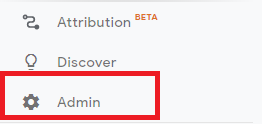
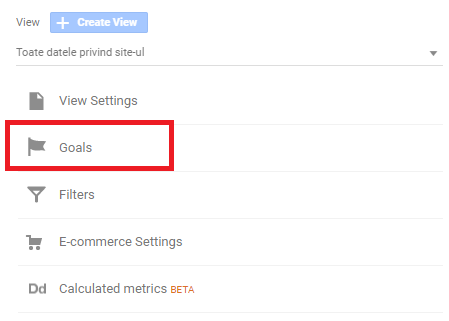
02. Click on the “+ New goal” button.

- Choose the ,,custom” setting, then name the lens and select its type. To start with, we will focus on ,,Destination”. Click on the next step.

- Enter the destination page path.
- Check that the lens has been set correctly by performing the action you set in point three.

Sales reports
In the ,,Acquisition” menu in Google Analytics there are six reporting options: overview, all traffic sources, Google Ads, search console, social networks and campaigns.
Overview
Through the overview you’ll be able to quickly see key traffic sources, useful purchase details, buying behaviour and conversions associated with other channels.
According to the information shown above, the main channel that brings the most traffic is organic searches, i.e. users entering the website after searching for certain keywords on Google or other search engines.
Traffic sources: channels
Although the channels subsection is somewhat similar to the overview, it additionally provides a graph showing details of purchases, user behaviour and conversions. For more information about each channel and the conversions prevented from it, click on the main channel.
As can be seen in the example above, most transactions come from other channels, which in our case is social media.
Traffic sources: source/media
In this section you will be able to see the most effective traffic sources from different individual channels. Medium values can be organic, paid, redirected or non-existent (in the case of direct sources). In addition to these, via UTM parameters you will be able to set your own channels and environments. Through these metrics, you will know which environments perform better for each channel. In the case of the example below, paid promotion brings the most results for search engines. As for social media, most purchases come from interactions, according to UTM metrics.
Traffic sources: references
The report that includes referrals eliminates search engines and direct traffic, showing only the domains that have referred to your website. When referring domains are accessed, you’ll be sent to other purchase details, such as the number of people who visited your website as a result of the referral, consumer behaviors, and conversion information, if any.
Google Ads: campaigns
With the campaign subsection you will be able to see which Google Ads campaigns generate the most sales, how many hits come from each ad and which keywords are most effective.
Google Ads: keywords
The keyword report contains the same information that you can find by accessing the information in the campaigns section. As above, you’ll have access to data such as keywords placed in Google Ads campaigns, number of hits, cost per click, user behaviour data and details of associated conversions.
Social networks: overview
Through the reports in the social media section, you will have access to information about conversions generated through this channel and traffic from different networks. On top of this, you can see the number of sessions from various mentions.
Social networks: network references
With the network referral report you will be able to see which networks drive visitors to your website. Note that the report focuses on visitor behaviour, not conversions. So you can see if one network performs better than another, or if users on one channel respond better to the same type of content than on other channels. In the example below you can see that most sessions come from Facebook.
Social networks: landing pages
In this section you can find out which pages get the most traffic from social networks.
Social networks: conversions
Find out which social networks bring the most website conversions! In the situation below, the top social media channel generating conversions is Facebook, followed by Instagram.
Campaigns: overview
Campaigns track visitor behaviour from campaigns set via UTM parameters or other sources (Google Ads). Each individually set campaign uses three UTM parameters: campaign name, source and medium. Let’s look at the example below!
Most transactions come from the campaign set by the agency via UTM parameters. In the UTM ,,guide-two” we can see the name of the campaign. When we access the campaign, we will be able to see both the source of sales and additional information.
We recommend the use of parameters to maintain a detailed record of user behaviour. This way, you will know which channels perform best, which marketing strategies bring the most results and therefore you will be able to adapt your future strategy according to the current results.
Conclusion
Google Analytics is a great tool, indispensable for building an effective marketing strategy. In addition to a wealth of information about users and their behaviour, you’ll be able to gain a broad marketing insight, covering all channels of promotion.